Beautiful video journaling,
on your Mac.
ClipDiary turns your everyday clips into a memory video, on your terms: mix photos and videos day to day, trim each moment with no length cap, layer on a soundtrack, and add designed title cards — all in a native Mac app that keeps everything local.
Free · Open source
Three steps to a month you can watch
Point it at your photos
Add the folders where your videos and photos pile up. ClipDiary indexes them by capture day. Nothing is copied until you pick it.
Pick your moments
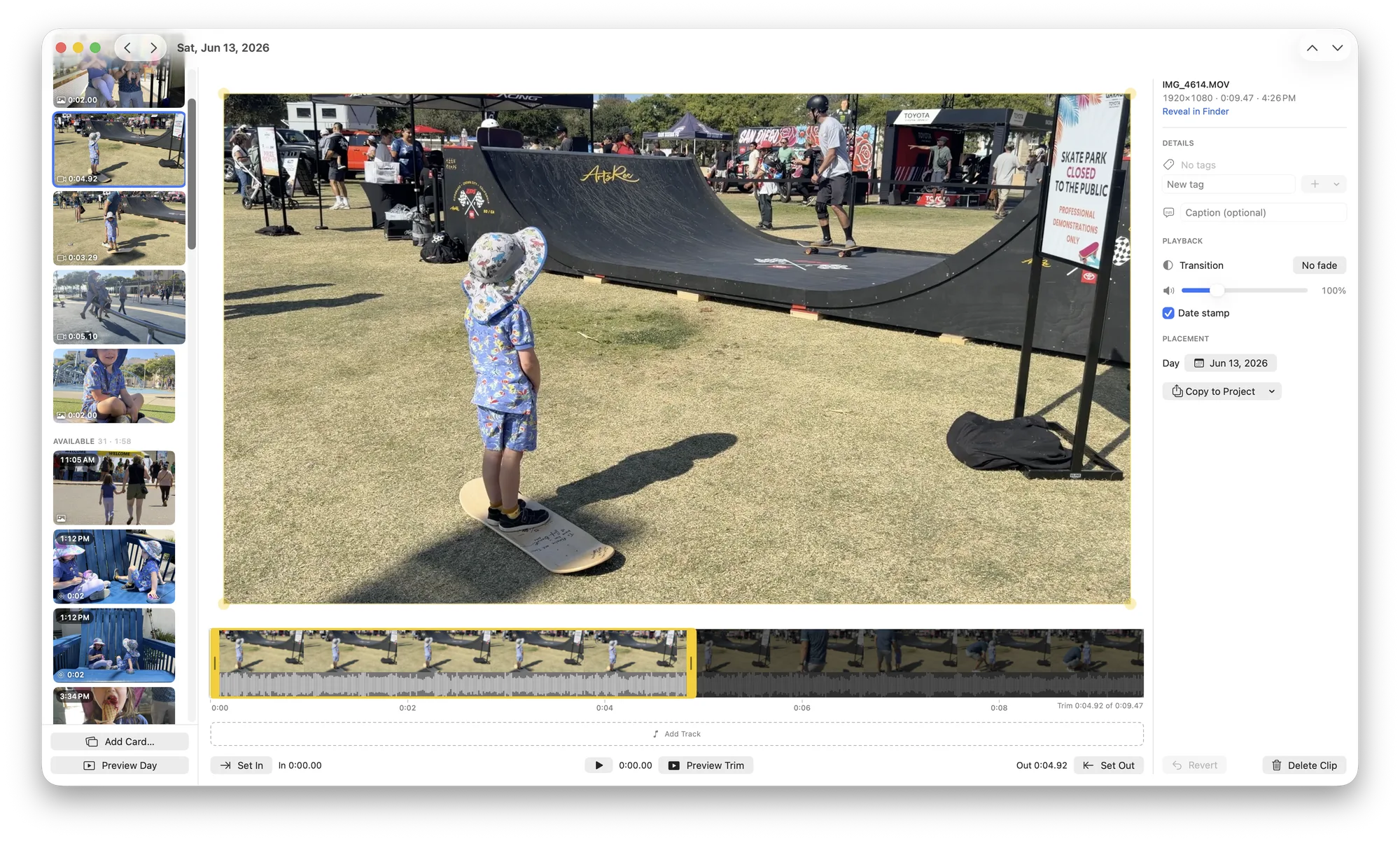
Open a day, flip through what you shot, and trim what’s worth keeping (one clip or several), then move on to the next day.
Create your video
Render any range (a month, a year, everything) with music, title cards, fades and date stamps, then save the MP4.
Built for making the video you actually want
The one-second-a-day idea, minus the limits, designed for editing comfortably on a desktop.
Filmstrip trimming
Drag in- and out-points on a filmstrip: cut the start and the end, frame-accurate.
Soundtracks
Lay music across a timeline, trim and fade each track, and hear it play as you edit.
Photos, cards & date stamps
Mix in stills, designed title cards, and the classic burned-in date stamp, or turn it off.
Calendar & source folders
Point it at a photo dump; each day shows what you shot so picking the keeper is quick.
Ergonomic by design
Every step works with the mouse and flies with the keyboard. Review a day, trim, add, and move on without breaking rhythm.
Import from 1SE
Bring in an existing 1 Second Everyday library from a video export or a data export.
Coming from 1 Second Everyday?
Import your existing library and keep going. ClipDiary just removes the limits.
Everything stays on your Mac
No accounts. No cloud. No telemetry. Your videos and photos are copied into a plain project folder you choose, and nothing ever leaves your machine.
Frequently asked
Is there a 1 Second Everyday app for Mac?
1 Second Everyday itself is phone-only, with no desktop version. ClipDiary is a native Mac app built on the same one-second-a-day idea: it reads the folders where your videos and photos already pile up, lets you pick and trim a moment per day on a big screen, and renders the month as a single video. It can also import an existing 1SE library.
Can I import my existing 1 Second Everyday library?
Yes, two ways. If you request 1SE’s “Download Your Data” export, ClipDiary reads every snippet with its real date and caption straight from the export. If all you have is a finished mashup video, ClipDiary splits it back into per-day clips by reading the date stamp burned into each frame.
Do my clips have to be one second long?
No. A clip can be any length, and a day can hold several. You set the start and the end by dragging in and out points on a filmstrip, so a two-second moment stays two seconds and a ten-second one is not cut off.
Does ClipDiary need an account or a subscription?
No. ClipDiary is free and open source, with no sign-in, no cloud and no telemetry. There is nothing to subscribe to and no export locked behind a paywall.
Where do my videos and photos end up?
In a plain project folder you choose, holding the clips you picked plus a small JSON file of your edits. Trims and crops are stored as metadata, so the media files themselves are never modified, and you can back the folder up or move it like any other folder.
Which Macs can run ClipDiary?
Any Mac on macOS 15 (Sequoia) or later. The download is a universal build, so it runs natively on both Apple silicon and Intel Macs.
Can I add music to my memory video?
Yes. A soundtrack timeline lays audio files across your days: drag a track to move it, trim which part of the song plays, set its volume, and fade it in or out. Music keeps playing over silent photos and mixes with the clips’ own sound.
Can I export a whole year instead of a month?
Yes. Any range works: one month, one year, everything you have, or a custom start and end date. Each range remembers its own cover and ending card, and the result is saved as an MP4.